

Scam calls, texts, and emails (often referred to as “phishing”), are rapidly increasing and becoming more sophisticated. Scammers often impersonate trusted financial institutions to steal authentication codes and member credentials. Staying vigilant is key to protecting your accounts, even for the most careful among us.
Below, we will give you a breakdown on how the most common scams work. You will learn about red flags to look out for and a step-by-step response plan. Additionally, we will introduce you to Logix’s Fraud Risk Meter. This will help you better understand and manage your personal scam risk. You will learn to protect yourself.
Why Scammers Succeed – Social Engineering, Identity Theft, & Tech Support Traps
Scammers often use psychological tricks. They may impersonate trusted employees of reputable companies. These scammers create a sense of urgency to pressure you into revealing authentication codes or personal information.
Read more about how scammers use social engineering to steal money and what you can do to combat this.
Scam calls and texts can also be the start of identity theft. Attackers seek even small details like your birthday, last four digits of your social security number, or a verification code. They use these to compromise your information.
Learn about the common identity theft tactics and their implications. These include phishing, credential stuffing, and account takeovers. Read more in our article, “How Does Identity Theft Happen?” Get proactive tips on how you can take proactive measures to safeguard your personal information.
One of the cleverest scam types is when fraudsters pose as legitimate computer or security technicians to access your accounts. In many cases, the victim is manipulated into believing there’s a critical error or urgent issue with their account. Often, the victim gives the scammers account access or shares credentials. This is where the criminal activity begins.
Our post “Tech Support Scams” explains in greater detail the types of methods fraudsters use to contact their victims. They lure them by asking for remote account access, installing malware, or demanding payment. The post also offers tips to help avoid falling for tech support fraud.
Scam Red Flags to Look Out For
Below we’ll highlight some of the most common scams and identity theft tactics. We’ll explain what they may look like, and you’ll learn what you can do about them.
Red Flag
What It Might Look Like
Why It’s Suspicious & What to Do
Urgent Language or Time Pressure
“Verify your account in 5 minutes or we’ll close your account.”

Scammers thrive on urgency. Treat any urgent request as suspicious.
Spoofed Caller ID or Unknown Numbers
Caller claims to be from Logix, and the Caller ID shows “Logix FCU,” but you didn’t initiate contact.

Caller IDs can be faked and spoofed. Properly verify the number on your end before proceeding.
Requests for Login Credentials or Passwords
You receive an unsolicited text or email with an authentication code that says, “never share this code with anyone.”

Legitimate financial institutions like Logix will never ask for your login credentials or passwords by phone, email, or text. Do not give this information out to anyone unless you reached out to the company first. **
Links or Attachments in Texts
“Click here to verify” with a suspicious URL.

The link may lead to phishing or malicious sites. Don’t click on the link; instead access your account through the company’s official website or app.
Poor Grammar, Typos, or Odd Formatting
“Urgent! Verify ur account now”

Mass scams often use poor, unprofessional language, or odd layouts.
Remote Access or Tech Support Requests
“Let me remote into your computer to fix this issue.”
Attackers may try to install malware or steal data through remote access. Do not allow access unless you’ve initiated and verified the contact.
Unexpected Money Transfer or Payment Requests
You receive a text, email, or DM on social media is asking for money via Zelle or other payment apps.
Even if the message says it’s from a trusted contact, their account may have been hacked and compromised. Confirm directly with the sender through a phone call.
** If a member calls us to request a transaction, a Logix employee may ask for your consent to send a verification code via text message. This is a legitimate security step to protect your account and only occurs when you initiate contact with us. If you receive a code without having contacted us first, that’s a red flag and could indicate a scam.
What to Do if You Get a Suspicious Message: A Simple 7-Step Action Plan
Here is a recommend action plan if you receive something suspicious that you believe may be a scam.
Step 1: Pause – Don’t Respond Immediately
Take a deep breath before reacting. Scammers are known to play into your emotions, feeding on a sense of urgency. Don’t click or respond right away.
Step 2: Capture Evidence
Take a screenshot of the suspicious message or email. This allows you to capture the phone number, time, and content of the message if you need it for further investigation.
Step 3: Avoid Interaction
Never click on links, open attachments, reply, or forward messages that you do not trust. Don’t provide one-time security codes or personal information. To check for alerts or messages, log into the company’s website or app directly (not from the link sent to you).
Step 4: Independently Verify
If you receive a suspicious message, contact the company directly using a phone number you’ve verified. This could be one from your debit card or credit card, a recent statement, or the company’s official website. Ask whether the message came from them. If the message appears to be from Logix, call us directly at (800) 328-5328.
Instructions for blocking calls and text messages*:
- iOS: For calls, go to “Recents.” Find the number you want to block. Tap the “i” icon and scroll down. Then press “Block Caller.” For text messages, open the message. Tap on the number you want to block. Tap info and scroll down. Then press “Block Contact.”
- Android: For calls, go to your recent call log. Tap the number you want to block. Then press “Block/Report Spam.”
For text messages, click into the message you want to block. Tap the three-dot menu in the upper right-hand corner. Then press “Block/Report Spam.”
You may also want to enable features that silence unknown callers or drive them to a spam folder.
*Depending on your messaging app, the steps above may be slightly different.
Step 6: Report the Scam
Forward suspicious messages to the real company. You can also forward spam texts to 7726 (SPAM) or file a report with authorities.
Step 7: Monitor Your Accounts
Regularly keep an eye out for any unusual activity on your checking, savings, and credit card accounts.
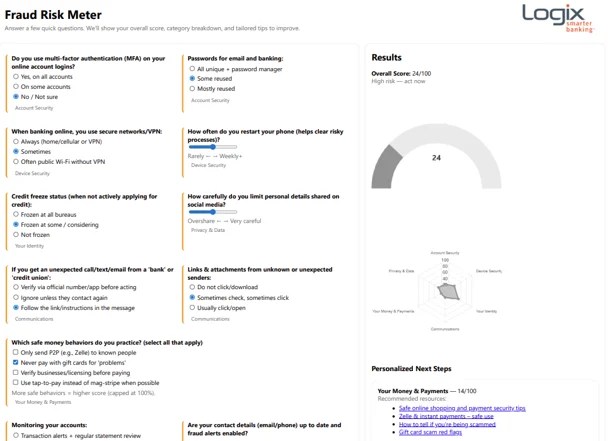
Stay One Step Ahead of Fraud with the Logix Fraud Risk Meter
So, how do you know whether you are at a higher risk, and what steps can you take to reduce that risk?
At Logix, protecting our members is a top priority. That’s why we offer the Fraud Risk Meter. It’s a simple, real-time tool, that lets you check your fraud risk score. You can also get personalized tips on how to lower your risk. The Risk Meter (hosted via eFraudProtection) asks a few quick questions. These include your use of multi-factor authentication and device habits. It generates an overall risk score and identifies vulnerable areas. A lower score indicates higher risk. However, it’s designed to help you target areas for improvement and not to predict specific attacks. Checking your score regularly can help you take steps to reduce your exposure to scams and identity theft.
Why Your Risk Score Matters
A low or moderate Risk Meter score may mean you’re more vulnerable to phishing scams or social engineering attacks. This is especially true if you have certain habits like high phone usage or sharing personal data across platforms. The personalized tips, along with those below, can help you build stronger defenses against fraud.
The good news? Your Fraud Meter score isn’t fixed. It can change as you build safer habits. We recommend you use the tool regularly for updated guidance and the best protection.
👉 Try the Logix Fraud Risk Meter to see your scam exposure score.
Ongoing Strategies to Reduce Your Scam Risk
Here are a few more habits and tips that can help reduce your scam exposure over time:
- Share personal data only with trusted sources
- Be selective about where you share contact details
- Use strong, unique passwords and enable multi-factor authentication whenever possible
- Activate your phone’s built-in spam protections or use reputable spam/call filter apps like Hiya or Truecaller
- Stay informed with updates from Logix SmartLab’s fraud and identity theft posts for evolving threats
Protecting yourself against scams requires ongoing effort. Every smart step you take lowers your risk and keeps your personal and financial information secure.
If you ever receive a suspicious message or call claiming to be from Logix, please contact us immediately at (800) 328-5328.
Visit Fraud and ID Theft Protection to explore other ways to protect your Logix accounts.
This post is for informational purposes only. All information is believed to be from reliable sources; however, we may no representation as to its completeness or accuracy.
